Diploma Pub Quiz!!!

Diploma Pub Quiz!!!!!!!!

This is an 'educational' pub quiz that me and Amanda put together as a 'livener' for our lesson to give the students a break and wake them up a bit. note the cleverly interspersed Diploma related questions with questions about popular culture...oh the genius of it!

Quiz Questions Creative & Media L3 Year 2 12.11.09


Q1. In which classic horror film did Jack Nicholson type the words: “All work and no play makes Jack a dull boy”? (1 MARK)


A. The Shining


Q2. Name 4 of the 6 PLTS categories. (4 MARKS)


A. Team Worker, Creative Thinker, Self Manager, Independent Enquirer, Reflective Learner, Effective Participator


Q3. In the music world, how is Marshall Mathers better known? (1 MARK)


A. Eminem


Q4. Name 3 of the 5 strands from the Every Child Matters agenda. (3 MARKS)


A. Be healthy, Stay safe, Enjoy & Achieve, Make a positive contribution, Achieve economic well-being


Q5. What relation is Doctor Evil to Austin Powers in the 'Austin Powers' film series? (1 MARK)


A. Twin brother


Q6. What are 10 of the 20 disciplines of the C & M diploma? (10 MARKS)


A. 2D Visual Art, 3D Visual Art, Graphic Design, Product Design, Fashion, Textiles, Photo Imaging, Craft, Publishing & Printing, Dance, Music, Drama, Advertising, Audio & Radio, Film, Television, Interactive Media, Animation, Computer Games, Creative Writing.


Q7. Which film starring Bette Midler features the song 'Wind Beneath my Wings'? (1 MARK)


A. Beaches


BONUS QUESTION!!!!!

Q8. Which of the following superheroes was first to appear in a comic strip: Spiderman, Superman or Batman? (1 MARK)


A. Superman


(TOTAL 22 MARKS)

Monday, 23 November 2009 at 12:52 , 0 Comments


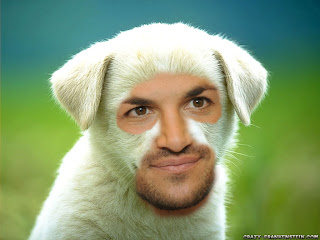
How to make a MANIMAL.

1
) Use the internet to find a 'straight on ' picture of a celebrity and another 1 of an animal
2) open photoshop and use the file menu to open the 2 images you have selected
3) Right mouse click on the photos titles and click on 'move to new window'.
4) Resize images so faces are around the same size using image - image size
5) find and select the clone tool
6) Hold down 'alt' and click between the eyes of your celebrity once
7) select your animal picture, hold down the left mouse button between the eyes and draw.
8) get a feel for how the tool works, you can always undo. you can change the size and shape by pressing brush at the top
9) Use this tool to create your manimal.
10) Save your image using the fie menu.

Here is an example of a Manimal that I made during our subject session, when Mr Rhys Bonney taught us how to produce these magnificent creatures.

at 12:07 , 0 Comments

PHOTOMONTAGE

HOW TO MAKE A PHOTOMONTAGE USING LAYER MASKS
All images can be found in the Student Folder > Newlyn Harbour.
Open image file Newlyn Nets. Click on the default Foreground and Background icon in the vertical toolbox to return to black & white.
Choose Image > Canvas Size and Increase the width size to 28cm and double-click on the Hand tool in the toolbox to maximise the image view.
Open image file Boats 1. Use the Move tool to click and drag it into the Newlyn image.
Use the Move tool to place the Boats 1 image to the left of the Newlyn Nets, and then click on the Add Layer Mask icon at the bottom of the layers palette.
Working on the Layer Mask, select the Linear Gradient tool from the toolbox. From the right edge of Boats 1, click and drag the cursor across to the left edge, then release the mouse button. This creates a smooth gradient fill within the Layer Mask, allowing the Boats image to seamlessly fade into the Nets image below.
Use the Paintbrush tool and black colour to remove the Layer Mask area around the left of the central Nets image to reveal it from below. Toggle to white to cover it back up.
Open image file Boats 2. Use the Move tool to click and drag it into the right side of the Nets image. You may need to Choose Edit > Transform > Scale to reduce its size until it’s the same height as the main image (hold Shift and drag from a corner). When it is the correct size, press Enter. Click on the Add Layer Mask icon in the layers palette.
Repeat steps 5 to 7 and then again adding images Boats 3 and Boats 4, or try others to make your own photocollage. Try variations using the Radial Gradient tool, click and drag the cursor from the centre or the edge to see the difference.
When you are happy with the completed
photomontage > Layer > Flatten Image
FURTHER NOTES.
Once the text is RASTERISED, you can` t edit the text anymore. But when you` ve rasterised it, you can edit it as a GRAPHIC. So you can change the overall bounding box, vanishing point, etc.
Always set the image size at the very start, depending what you are working on. So if the students are working on CD covers, they need to find out the dimensions and set them on the file.
A good way to show Photoshop work development is to save each layer as a saved screen and annotate it showing what you` ve done / changed and why.

Friday, 6 November 2009 at 15:17 , 0 Comments

Photoshop
Using Layer Masks


PHOTOSHOP
Using Layer Masks.
You can use a layer mask to control how different areas within a layer are hidden and revealed. By making changes to the layer mask, you can apply a variety of special effects to the layer without actually affecting the image on that layer.

1) Go to File > Open > Publish > Students > Images and open the images Clouds and Church.
2) Select the Move tool from the toolbox and then placing it in the clouds image, click and drag the image over into the church image and position it at the top.
3) The clouds image now occupies its own layer. Click on the add layer mask icon at the bottom of the layers palette.
4) Make sure that black and white are the foreground and background colours respectively. Select the Linear Gradient tool from the toolbox.
5) Click and drag upwards on the clouds picture, from the horizon line to halfway into the clouds, then release. Once released, the Layer Mask causes the upper layer to seamlessly fade into the one below.
6) Select the Paintbrush tool and choose a brush from the Brushes palette. Select a suitable size and lower the opacity to 25% or lower.
7) Use black to further remove areas of the Layer Mask or white to replace. In the brush options, select different modes in the dropdown menu to see how the image changes.
………………………………………………………………………………..

at 15:08 , 0 Comments

3 picture story

3 PICTURE STORY.
The basis of Documentary.
1 ESTABLISHING SHOT; an OVERVIEW, which sets the scene.
1 MEDIUM SHOT; normally, but not always, shows the main action.
1 CLOSE UP SHOT; often a symbolic image determining the overall MOOD of the 3 picture set.
nb; these shots are also the BASIS OF CINEMA, though film requires additional linking shots called CUT INS nad CUT AWAYS to deal with the movement through time and space.

at 15:04 , 0 Comments

CREATIVE THINKING

CREATIVE THINKING
De Bono`s Theory; Creative thinking is a SKILL:it can be TAUGHT.
TONY BUZAN;
6 aspects of Creative Thinking.
1) EVERYONE IS CREATIVE. Self esteem: encouraging open thought so that all students have the motivation to try things out.
2) THE LEFT AND RIGHT BRAIN. Creativity is generally thought of as right brained but actually uses the whole brain.
3) SPEED OF THOUGHT. Productivity; 1 of the hallmarks of creative genius.
4) ORIGINALITY OF THOUGHT. Thinking outside thebox. (Relative.)
5) FLEXIBILITY OF THOUGHT. How many perspectives can I look at this from?
6) IMAGINATION AND ASSOCIATION. To find the associations between things that are going to create something new.
IDEAS OF CREATIVE THINKING SKILLS STARTERS
Speed of thought; Alphabet game but using films. Go through the alphabet thinking of a film beginning with each letter.
Originality of thought; Each student chooses their favourite character from a book. Then imagine that character as a piece of furniture, (draw it), a smell, a taste, a piece of music, etc. Lateral / metaphorical thinking.
Flexibility of thought; Separate students into groups. Give each group 3 balloons. They have 4 mins to make anything/ do anything they want with the balloons. Don` t necessarily have to blow them up.
Lateral thinking; questions; eg: there are 6 eggs in the basket. 6 people each take 1 of the eggs. How can it be that there is still 1 egg left in the basket? A; the last person took the basket with the egg in it.
Using PROPS in a different way. eg; a toilet seat for a wig.
Show them a still from a film. What happened before it? What happened after?
POSSIBLE BARRIERS TO CREATIVE THINKING
Self belief. Time limits. Resources. Budget. Environment. External pressures. Trust / safety issues. Conditioning of not being good enough.
IDEA FOR YEAR 7 LESSON ON SURREALISM
Have a list of verbs and a list of nouns. Students pick 1 off each list and then produce a drawing based on that.

at 13:52 , 0 Comments

COACHING

COACHING
GROW Model.
GOAL; What do you want to achieve?
REALITY; Where are you now? What tools, assets, or equipment do you have that might assist you in reaching you goal?
OPTIONS/ OBSTACLES? What are the different ways you might approach this?
WILL; What will you do next?


I learnt this technique this week and thought that it was very useful in order to help teach the students to become Independent Enquirers.

at 13:48 , 0 Comments